> For the complete documentation index, see [llms.txt](https://docs.lilypad.tech/lilypad/llms.txt). Markdown versions of documentation pages are available by appending `.md` to page URLs; this page is available as [Markdown](https://docs.lilypad.tech/lilypad/resource-providers/update-your-node.md).
# Update node
Instructions to update the Docker Lilypad Resource Provider (RP)
To update a Lilypad RP, remove any previous versions of Lilypad on the instance and then follow the instructions to setup a Docker RP.
* If the Lilypad install for Linux was previously used on the RP, first [remove](https://docs.lilypad.tech/lilypad/resource-providers/update-node#ensure-all-processes-from-linux-install-are-stopped-and-removed)[ the install](https://docs.lilypad.tech/lilypad/resource-providers/update-node#ensure-all-processes-from-linux-install-are-stopped-and-removed). Then follow the [install instructions](https://docs.lilypad.tech/lilypad/resource-providers/update-node#install-and-run-a-new-version-of-lilypad).
* If the RP previously used a Docker Lilypad version,[ previous Docker containers and images](https://docs.lilypad.tech/lilypad/resource-providers/update-node#update-lilypad-version-for-docker-rp), then follow the [install instructions](https://docs.lilypad.tech/lilypad/resource-providers/update-node#install-and-run-a-new-version-of-lilypad).
## Ensure all processes from Linux install are stopped and removed
*This only applies if you had a Linux version installed*
### 1. Stop all systemd processess
```bash
sudo systemctl stop bacalhau
```
```bash
sudo systemctl stop lilypad-resource-provider
```
### 2. Disable the systemd services:
```bash
sudo systemctl disable bacalhau
```
```bash
sudo systemctl disable lilypad-resource-provider
```
### 3. Delete the service files from the systemd directory.
{% hint style="info" %}
*Note: Be extremely careful when using `sudo` to remove files.*
{% endhint %}
```bash
sudo rm /etc/systemd/system/bacalhau.service
```
```bash
sudo rm /etc/systemd/system/lilypad-resource-provider.service
```
### 4. Reload the systemd daemon to apply the changes.
```bash
sudo systemctl daemon-reload
```
## Remove old Docker containers and images
### 1. If a Docker RP is running stop the system (if the node is not running, disregard this first step)
```bash
docker compose down
```
### 2. You can check the status of the containers with:
```bash
docker ps -a | grep -E "resource-provider|ipfs|watchtower"
```
If they are running, stop them with:
```bash
docker stop
```
Remove the containers:
```bash
docker rm
```
### 3. View all Docker images
```bash
docker images
```
### 4. Take note of the IMAGE ID for each lilypad image (resource-provider, bacalhau, and watchtower)
Delete old Docker images that are duplicates for Lilypad (Bacalhau, Lilypad)
```bash
docker rmi
```
{% hint style="info" %}
*`docker volume prune` can also be used to remove specific images that aren't being used.*
{% endhint %}
## Install and Run a new Version of Lilypad
{% hint style="info" %}
If a RP was running on the Lilypad Testnet in 2024, it is recommended to create a new wallet when joining the network again for the RP Beta program. If a RP wants to use the same wallet, feel free to try running the RP and let our team know if any issues with running jobs are experienced.
If a wallet has been used to run CLI jobs on Lilypad, this wallet cannot be used for a RP). See the Docs for [Setting up a Metamask Wallet](/lilypad/quickstart/cli/setting-up-your-wallet.md)
{% endhint %}
### 1. Export WEB3\_PRIVATE\_KEY as an environment variable
```bash
export WEB3_PRIVATE_KEY=
```
### 2. Use `curl` to download the `docker-compose.yml` file from the Lilypad GitHub repository.
```
LATEST_VERSION=$(curl -s https://api.github.com/repos/Lilypad-Tech/lilypad/releases/latest | sed -n 's/.*"tag_name": "\(.*\)".*/\1/p')
curl -o docker-compose.yml "https://raw.githubusercontent.com/Lilypad-Tech/lilypad/$LATEST_VERSION/docker/docker-compose.yml"
```
### 3. Start your Lilypad Node
```bash
WEB3_PRIVATE_KEY= docker compose up -d
```
OR start with your own RPC URL
```bash
WEB3_PRIVATE_KEY= WEB3_RPC_URL=wss://arb-sepolia.g.alchemy.com/v2/your-alchemy-id docker compose up -d
```
## Monitor the Resource Provider
Use the following command to check the status of the resource provider and bacalhau.
```bash
docker logs resource-provider
```
```bash
docker logs bacalhau
```
Use the following command to view the containers running after starting Docker Compose.
```bash
docker ps
```
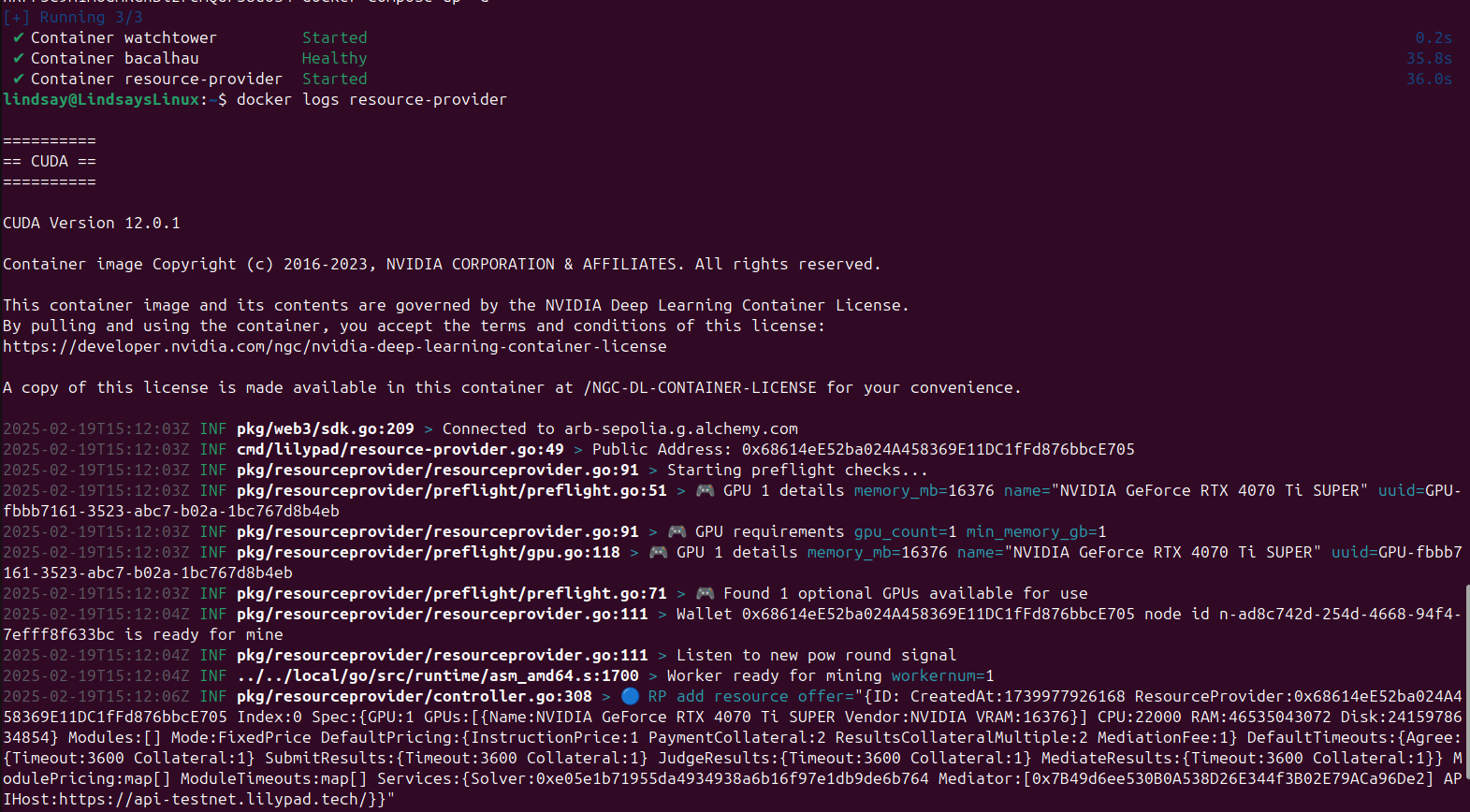
A healthy, updated node should have all containers started, a preflight check, and be adding a resource offer.
---
# Agent Instructions
This documentation is published with GitBook. GitBook is the documentation platform designed so that both humans and AI agents can read, navigate, and reason over technical content effectively. Learn more at gitbook.com.
## Querying This Documentation
If you need additional information that is not directly available in this page, you can query the documentation by asking a question.
Perform an HTTP GET request on the following URL with the `ask` and `goal` query parameters:
```
GET https://docs.lilypad.tech/lilypad/resource-providers/update-your-node.md?ask=&goal=
```
`ask` is the immediate question: it should be specific, self-contained, and written in natural language.
`goal` is what the user is ultimately trying to achieve, the reason they need the answer. Sharing it helps GitBook give you a better, more relevant answer. A goal is most helpful when it describes the outcome the user wants rather than restating the question. For example, with `ask=how do I create an API token`, a goal like `automate deployments from our CI pipeline` lets GitBook tailor the answer to that use case.
The response will contain a direct answer to the question and relevant excerpts and sources from the documentation.
Use this mechanism when the answer is not explicitly present in the current page, you need clarification or additional context, or you want to retrieve related documentation sections.